Monday, September 29, 2014
Jing
Jing is an easy to use desktop software to share captured images off your own screen, as well as short videos of you performing some task on your own computer. This can easily be very useful for work, home, play, hobby ... but definitely to teach something specific to your students. The same software enables you with such functionality and at the same time allows you to add extra stuff to your captured images and videos and share them online in a couple of steps.
I have shared an overview video on our MVCR group through Diigo :) which I followed from http://www.techsmith.com/jing.html
With Jing you can:
- Capture
- Record
- Share
A really short video on how to use Jing is found here:
https://www.youtube.com/watch?v=HZKhz0tSVII
Thursday, September 25, 2014
Scoop.it!
At a first glance or a straight answer to what is Scoop.It you will get the following ...
Scoop.it: You are the content you publish.
Logging in can't be easier as it picks up either your Facebook account or Twitter account. The system explicitly ask a simple tick your interests popup and automatically populates your front interface without experiencing the traditional 'cold start' problem.
As a curation engine this fantastic service allows you to excel in what interests you most and probably you are the best person to curate material about that particular topic. As shown in the image below you can access material online, aggregate it efficiently as you're the expert in that area and eventually create now content. Together with the software the individual user can assist the crowd even more by sharing, synthesising, filtering, researching and discovering new material.
Finally, the applicable areas that can benefit from Scoop.It are limitless especially in Education. Just to give one example, as shown below, it can be optimally employed with young students to recreate an old skill ... story-telling. Scoop.it allows users to build an entire story line by reusing related online content that has been carefully and meticulously selected, picked, tailored and tweaked to fit the purpose.
Tuesday, September 23, 2014
Educators Resource Portal - MERLOT
This portal allows educators to access, search, and use / reuse educational resources as part of their teaching material.
Some resources are protected by 'copyright' so users need to request permission from the rightful authors who have obviously provided the resource in the first place.
Some other resources fall under the 'creative commons' and thereby can be reused without prior permission usually for educational purposes only.
Finally, some resources fall under the 'public domain' and these can be used without any permission.
Merlot has numerous capabilities as shown below:
Try it yourself ... http://www.merlot.org/
Ready-Made Content
Educators depend and count on readily available content to use as teaching resources within their lesson plan. Copyright issues need to be respected and ensure to make reference to any resource which is not theirs crediting the rightful author/s.
Erik Nelson discusses the impact of Technology and Education on Copyright law in a paper entitled "Copyright and Distance Education: The Impact of the Technology, Education, and Copyright
Harmonization Act", available from:
Erik Nelson discusses the impact of Technology and Education on Copyright law in a paper entitled "Copyright and Distance Education: The Impact of the Technology, Education, and Copyright
Harmonization Act", available from:
Here are some Key Definitions and Explanations of Intellectual Property, Copyright Law, and Fair Use from Section 101 of Title 17 of the US Copyright Law code.
- Literary works are works, other than audiovisual works, expressed in words, numbers, or other verbal or numerical symbols or indicia, regardless of the nature of the material objects, such as books, periodicals, manuscripts, phonorecords, film, tapes, disks, or cards, in which they are embodied.
- Pictorial, graphic, and sculptural works include two-dimensional and three-dimensional works of fine, graphic, and applied art, photographs, prints and art reproductions, maps, globes, charts, diagrams, models, and technical drawings, including architectural plans. Such works shall include works of artistic craftsmanship insofar as their form but not their mechanical or utilitarian aspects are concerned; the design of a useful article, as defined in this section, shall be considered a pictorial, graphic, or sculptural work only if, and only to the extent that, such design incorporates pictorial, graphic, or sculptural features that can be identified separately from, and are capable of existing independently of, the utilitarian aspects of the article.
- Motion pictures are audiovisual works consisting of a series of related images which, when shown in succession, impart an impression of motion, together with accompanying sounds, if any.
- Sound Recordings are works that result from the fixation of a series of musical, spoken, or other sounds, but not including the sounds accompanying a motion picture or other audiovisual work, regardless of the nature of the material objects, such as disks, tapes, or other phonorecords, in which they are embodied. [the last statement on nature of the material objects allows extension of this definition to digital music.]
- Phonorecords are material objects in which sounds, other than those accompanying a motion picture or other audiovisual work, are fixed by any method now known or later developed, and from which the sounds can be perceived, reproduced, or otherwise communicated, either directly or with the aid of a machine or device. The term phonorecords includes the material object in which the sounds are first fixed.
- A work is created when it is fixed in a copy or phonorecord for the first time; where a work is prepared over a period of time, the portion of it that has been fixed at any particular time constitutes the work as of that time, and where the work has been prepared in different versions, each version constitutes a separate work. [fixed includes in any tangible medium including a web environment and even an email message]
- A work is fixed in a tangible medium of expression when its embodiment in a copy or phonorecord, by or under the authority of the author, is sufficiently permanent or stable to permit it to be perceived, reproduced, or otherwise communicated for a period of more than transitory duration. A work consisting of sounds, images, or both, that are being transmitted, is fixed for purposes of this title if a fixation of the work is being made simultaneously with its transmission. [Notice the mention of transitory duration. This stipulation is there to enable short term cache copying of web sites without copyright violations.]
- A pseudonymous work is a work on the copies or phonorecords of which the author is identified under a fictitious name. [The author under his/her real name would hold the copyright barring any contracts or stipulations to the contrary.]
- A collective work is a work, such as a periodical issue, anthology, or encyclopedia in which a number of contributions, constituting separate and independent works are assembled into a collective whole.
- A compilation is a work formed by the collection and assembling of preexisting materials or of data that are selected, coordinated, or arranged in such a way that the resulting work as a whole constitutes an original work of authorship. The term compilation includes collective works.
- A derivative work is a work based upon one or more preexisting works, such as a translation, musical arrangement, dramatization, fictionalization, motion picture version, sound recording, art reproduction, abridgment, condensation, or any other form in which a work may be recast, transformed, or adapted. A work consisting of editorial revisions, annotations, elaborations, or other modifications, which, as a whole, represent an original work of authorship, is a derivative work.
- A joint work is a work prepared by two or more authors with the intention that their contributions be merged into inseparable or interdependent parts of a unitary whole.
Worth distinguishing between:
Tuesday, September 16, 2014
This cool app available over all mobile platforms allows synchronous communication between people on the move....
One example where I used it was during a small conference of some 50 participants and the organizer coordinated all,contacts so,we all,had each other's cell,number automatically on registration. Every one could send a single message and got,it distributed in real time to all others triggering a flood of responses like:
- Where is conference room K?
- What time is lunch?
- What you guys doing tonight?
- Demo starting near the pool,of you want to join ....
- Etc ...
It obviously allows multiple chats, single and group, and integrates all media common to social media .. So no wonder it's killing them off ...
Finally, I,would,like,to add that we even created a log of all the conference chats and formed part of our memento of that event ... Really cool.
Flash Meeting
This web conferencing facility that is made freely available by the Open University started as an academic project and turned successful for use by Academics at OU and others online.
http://flashmeeting.open.ac.uk/home.html
What's really cool about it is ...
http://flashmeeting.open.ac.uk/home.html
What's really cool about it is ...
- Takes numerous participants;
- Allows multiple interventions like in a physical meeting;
- Easy to administer and set up;
- Coordinates the meeting by ensuring only 1 "live" speaker at a time ... Rarely happens in a civilized meeting :)
- Others can book an intervention and a queuing system is set up to be fair with all;
- Logs the entire meeting and makes it available online;
- Can rerun the entire meeting to make notes or check out a particular issue;
- Can experience the meeting if you were not able to attend;
- Allows running chat in parallel with video & audio;
- Allows common board for participants to interactively sketch and communicate;
- Allows file upload for participants to share resources;
- Allows URL submission and loading of the website onto the interface;
- Provides a common projection screen for participants to load presentations, images or other visual stuff for all others to see while doing an intervention.
Some screen shots ...
The main interface
Participants queued up to do their intervention ...
And finally a rerun of a recorded session with individual participants' intervention statistics ...
Tuesday, September 9, 2014
Use of Blogs and Wikis in Education ...
http://seriouslyvirtual.wordpress.com/ is an excellent blog that a colleague from the faculty of Education maintains and updates regularly. The insights with each respective entry places the contents into perspective and helps educators relate and thereby prone to make use of it themselves in class.
Other stuff related to the use of Wikis and Blogs in Education are:
- http://educationalwikis.wikispaces.com/Examples+of+educational+wikis
- http://edublogawards.com/2013awards/best-use-of-wikis-in-education-2013/
- http://edtechtoday.wordpress.com/2008/05/21/10-best-practices-for-using-wikis-in-education/
Cool video clip about the use of Wikis in Education
Another about Blogs
And finally about use of Wikis & Blogs in Higher Education
Monday, September 1, 2014
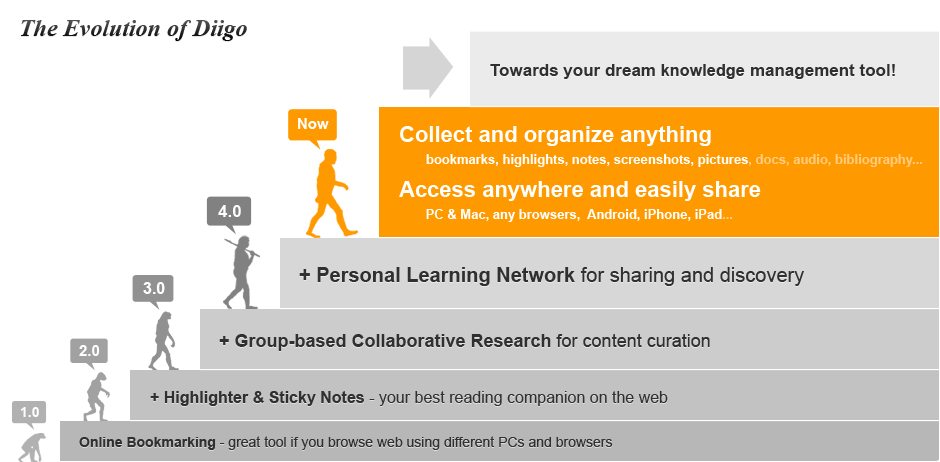
Diigo
First new tool that was introduced during TT1441 ... diigo :) ... feeling excited
My diigo account: https://www.diigo.com/user/mattmontyDiigo is a cool repository to save, organise and annotate online stuff that you consider interesting, useful and important ... thereby very handy for educators.
- How can one use Diigo?
- Effective use of online browsing;
- Create a rich personal knowledge base;
- Excellent archiving / caching of target website;
- Personal notes directly over websites;
- Customised organisation according to personal system;
- Sharing opportunities increase over other social media;
- Collaboration increases with students and colleagues.
- Was interesting to view how the tool evolved ...

- Found this interesting Youtube introductory clip about it too ...
- How can Diigo be used in a classroom?

- 12 Reasons Teachers should use Diigo ...
http://resourcelinkbce.wordpress.com/2011/07/19/12-reasons-teachers-should-use-diigo/
Subscribe to:
Comments (Atom)